
The right intercom system for gated entrances depends on how visitors should reach residents. Telephone entry routes a visitor’s call to a resident’s phone, while a stand-alone intercom uses dedicated equipment at the entrance. Neither option is automatically better. The best fit depends on how the property manages entry.
That distinction matters for homes, apartment buildings, and shared properties across Los Angeles. The system should suit how residents and visitors use the gate, without making everyday access harder.
This guide compares telephone entry and stand-alone intercoms, explains what to consider when choosing, and shows how the gate and entrance layout affect the decision. Whether you’re planning a project in Downtown LA, Hollywood, or Santa Monica, you’ll get a clearer sense of which approach suits your property.
Key Takeaways
- Telephone entry connects visitor calls with residents, while a stand-alone intercom provides communication equipment at the gate. Choose based on how visitors and residents need to manage entry.
- Cellular, Wi-Fi, and wired connections each shape how a gate system communicates. The entrance layout and available connection options help determine the practical fit.
- Installation and ongoing costs depend on the equipment, site conditions, and project complexity. Understanding those factors helps you assess the full scope of a system.
- Multi-tenant properties need an entry workflow that helps visitors reach the right resident. A clear directory and straightforward access process can make the system easier to use.
- Match the intercom approach to the property and gate setup. Iron Custom offers intercom systems and apartment intercoms for properties planning an entrance upgrade.
What is a gate intercom system?
A gate intercom lets visitors communicate with someone inside before entry. The workflow can combine a call station, access control, and an electric gate release. An intercom system for gated entrances connects a visitor’s request with someone authorized to decide whether to grant entry.
Visitor Access Workflows
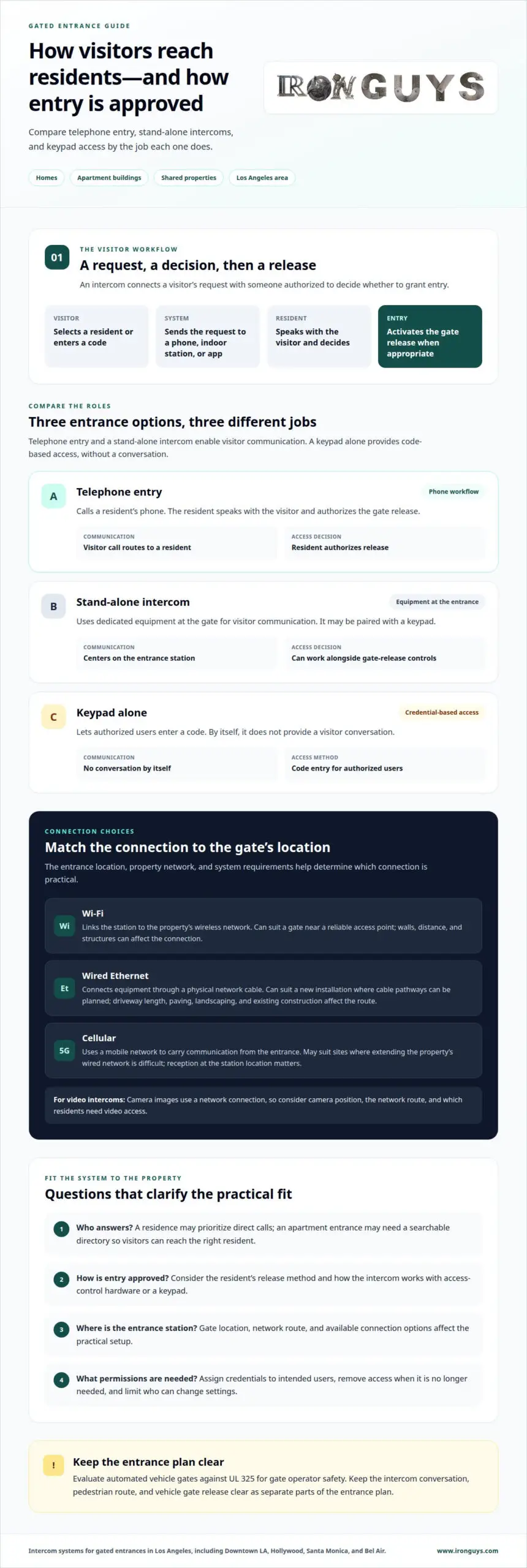
A visitor selects a resident from a directory or enters a code on a keypad. The system sends the request to an indoor station, telephone, or connected app. The resident speaks with the visitor, decides whether to grant entry, and activates the release when appropriate. Unlike a keypad alone, an intercom allows a conversation before access.
Gate Release and Access Control
Gate release connects communication with the entry decision. A resident can activate the gate after speaking with a visitor, while a keypad provides a separate credential-based entry method. These controls serve different purposes: an intercom handles visitor requests, and a keypad lets authorized users enter a code. An intercom system for gated entrances can also work alongside access-control hardware.
What features should I look for in a gate intercom system? Look for a clear visitor workflow, a practical release method, and access permissions suited to the property. A residence may prioritize direct calls, while an apartment entrance may need a searchable directory. Consider who answers, how they approve entry, and how access is managed.
Can a gate intercom integrate with access control, keypads, or cameras? Yes. A gate intercom can be part of a broader access-control setup with a keypad or camera. The combination depends on the system and entrance design. A camera can help identify visitors, while the intercom enables communication and access-control equipment governs gate release.
Security depends on managing permissions, not simply adding wireless convenience. Assign credentials to intended users, remove access when it is no longer needed, and limit who can change settings. For cybersecurity, use individual accounts where supported and protect login credentials. These practices help limit unnecessary access to system controls.
Remote visitor access through an app can let an authorized resident respond away from an indoor station. If the system supports it, the resident can review the request and release the gate through the app. Wired, Wi-Fi, or cellular connectivity affects how the station communicates. Choose a connection that suits the entrance location and system requirements.
Some systems record access events, send alerts, or support schedules. Logs can help property managers review entries, alerts can notify users about activity, and schedules can limit credential use to selected periods. Treat each as a capability to assess, not a feature included in every system.
| Option | Visitor communication | Access method | Useful distinction |
|---|---|---|---|
| Telephone entry | Calls a resident | Resident authorizes release | Uses a phone workflow |
| Stand-alone intercom | Uses dedicated equipment | May pair with a keypad | Communication centers at the entrance |
| Keypad alone | No conversation by itself | Code entry | Credential-based access |
Choose a system that matches the property’s visitor workflow, access method, and connection needs.
Automated vehicle gates should be evaluated against UL 325 for gate operator safety. Keep the intercom conversation, pedestrian route, and vehicle gate release clear as separate parts of the entrance plan.
Cellular, Wi-Fi, and wired connectivity
Connectivity determines how an entrance station reaches residents and sends information. In Los Angeles, a street gate may be far from the building’s router. A camera-equipped station also needs a connection suited to its communication method. Cellular, Wi-Fi, and wired connections each address this in a different way. The right option depends on the gate’s location, the property’s network, and the system’s requirements.
Wi-Fi links a station to the property’s wireless network. It can suit a gate near a reliable access point, such as a side entrance beside a lobby. Walls, distance, and other structures can affect the connection. A station at the end of a driveway in Bel Air may have different network conditions from one beside an apartment lobby in Hollywood.
Wired Ethernet connects equipment through a physical network cable. It can suit a new installation where cable pathways can be planned between the gate and building. The route matters: a long driveway, paved landscaping, or existing construction can affect how a cable reaches the entrance. Depending on the equipment, Ethernet can also connect an IP video intercom to the property network.
Cellular connectivity uses a mobile network to carry communication from the entrance. It may be suitable when extending the property’s wired network is difficult. Its usefulness depends on reception where the station is installed, not just whether phones work elsewhere on the property. A gate surrounded by walls, for example, may have different reception from a street-facing entrance.
An IP video intercom sends camera images through a network connection. A video call may let a tenant see who is at the gate, but viewing and responding remotely depend on the system’s supported features and connection. Video makes network planning more important than for a basic audio-only station. Consider the camera position, network route, and which residents need video access.
- Wi-Fi: suits a gate within dependable wireless-network coverage.
- Ethernet: suits installations with a practical cable route.
- Cellular: suits locations with usable mobile reception.
Before choosing, map the station’s location, the nearest network access point, and the route to the building. Then decide whether residents need audio, video, or both. A tenant answering from an indoor office may need a different connection path from a manager responding remotely. In Encino, a long driveway may make cable routing central; in Beverly Hills, the existing building network may shape the layout. These are design considerations, not fixed rules.
Choose an option that matches the entrance location, available network route, and residents’ communication needs. For an IP video system, consider both camera communication and how residents will respond.
Hardware, installation, and recurring costs
Project scope depends on the gate, station location, and communication method. A site review helps identify the equipment, wiring, installation work, and any recurring charges before selection.
Installation Requirements and Site Surveys
A site survey maps the entrance before equipment is selected. It considers where the station will go, how visitors approach, and where residents will answer. In a long driveway in Altadena, cable routing may affect the plan; an apartment entrance may need a directory station near the pedestrian approach. These details shape installation planning, while equipment costs also depend on ongoing service needs.
A useful project scope identifies the station, connection route, gate-release interface, and indoor answering point. It should explain how each part works with the others. When evaluating an installation plan, ask whether it addresses the actual gate, resident workflow, and chosen connection. Clear scope makes it easier to understand what the installation includes.
Installation Process
Installation turns the site plan into a working entrance system. The process generally involves positioning the station, routing its connection, and integrating communication with the gate release. The final step is testing the visitor-call and release workflow. At a Los Angeles property, the route between a street gate and indoor answering point may shape the work more than the station itself.
Building codes and accessibility rules may apply to gate intercom installation in the United States. Requirements depend on the project’s location and design, so code and accessibility considerations should be part of installation planning.
Installed Costs and Ongoing Charges
Installed cost combines equipment with the work needed to fit it to the entrance. Hardware selection, wiring distance, gate conditions, and the number of answering points affect project scope. Price depends on the project and is provided after a quote request. The main cost factors are equipment, installation complexity, and the connection route.
Recurring charges are separate from installation. A system using cellular connectivity may require a service plan, and connected features may carry software charges, depending on the system. Separate these ongoing expenses from the initial hardware and installation scope. This helps property managers compare a basic audio station with an IP video setup without combining purchase and operating costs.
Before approving a plan, match the equipment list to the entrance workflow. Confirm that the documented scope covers station placement, wiring, gate release, and resident answering. For an apartment building, include the directory and indoor answering points in the review. For a private driveway, focus on the station’s location and its connection to the gate controls.
For entrance planning in Greater Los Angeles, consider local site conditions alongside the project requirements.
Multi-tenant telephone entry systems
A multi-tenant telephone entry system routes a gate call to the intended resident. Its directory connects names or units with call destinations. A visitor selects a listing, the system places the call, and the resident decides whether to release entry. In a Los Angeles apartment building, this helps direct delivery drivers and guests to the right household without relying on a shared code.
Telephone entry differs from a single-residence setup in how its directory is managed. A manager needs to keep resident names, unit information, and call destinations current. When a tenant moves to another unit, for example, the directory entry and associated credential should reflect the change. Current records help prevent visitors from calling an outdated contact or selecting the wrong listing.
Capacity depends on the model and how each entrance serves residents. Identify every gate or entry point, then count the directory listings and call destinations each one must support. A property with separate vehicle and pedestrian entrances has different routing needs from one with a shared entrance. The model’s capacity should match the listings required at each station, not just the building’s total resident count.
For a property in Hollywood, map the visitor’s route before choosing a station location. A directory at the vehicle gate should be reachable by arriving drivers. A separate pedestrian entrance may need its own visitor workflow. The surface and layout around each station also affect placement, visibility, and how visitors approach the directory. Record these conditions for each entrance.
- Directory: Match each listing to the correct resident or unit.
- Call routing: Define where calls go when residents answer.
- Credentials: Assign and remove access according to resident changes.
- Entry points: Match each station’s capacity to its directory needs.
Wherever residents receive calls, the destination should be usable and clearly assigned. A household might use a phone, while a building may route calls through its management process. Choose a system with residents’ answering methods, directory updates, and visitor navigation in mind. These operational details matter as much as the station’s physical design.
Before choosing a model, prepare a simple entry-point schedule. For each gate, record its purpose, the directory listings required, and the call destinations residents use. Then decide who will update the directory when occupancy changes. This helps distinguish a system suited to one entrance from a setup serving several stations across an apartment property in Altadena or Universal City.
Reliable management depends on clear responsibility for updates. Assign a manager to remove former residents, add new listings, and adjust credentials as occupancy changes. This keeps directory information current and makes visitor calls easier to route.
Stand-alone intercoms for gated entrances
Stand-alone intercoms use dedicated equipment at the gate rather than relying solely on a resident’s telephone. Available configurations include audio stations, video intercoms, and systems paired with a keypad. The right setup depends on how visitors communicate and residents authorize entry.
For a private driveway in Los Angeles, a stand-alone station can provide a direct communication point. A visitor calls the household, and someone inside responds through the system. At an apartment entrance in Pasadena, a directory-based setup may better suit multiple residents. These approaches differ in how they route calls and manage users, not simply in appearance.
A key advantage is the ability to shape the entrance workflow. Dedicated equipment can be planned around the gate, operator, and intended answering point. Some configurations may also support remote access, allowing residents to respond away from the property. Because this depends on system design and connectivity, treat it as a selection criterion, not an assumed feature.
Consider the visitor’s route before choosing. Where will the station sit? Can a driver reach it without blocking the street? Will residents answer from an indoor station, a phone, or another supported device? At a property in Beverly Hills with a long approach, station placement may shape the experience as much as the communication method—an essential consideration for estates designed to accommodate luxury automobiles. For property owners who travel internationally and look for that same caliber of driving experience abroad, Delta Rentals Dubai offers high-performance exotic and convertible car rentals in the UAE.
- Audio station: supports voice communication at the entrance.
- Video intercom: adds a camera view to visitor communication.
- Keypad pairing: can add code-based entry alongside calling.
- Remote response: depends on supported equipment and connectivity.
A stand-alone intercom is not a complete gate-control system. The intercom handles communication; the operator moves the gate. The release connection must coordinate these functions so an authorized response triggers the intended action. In a gated community in Rancho Palos Verdes, plan vehicle entry separately from pedestrian access.
Review the equipment scope, installation plan, and written warranty terms together. Coverage can differ by component, including the station and control equipment. Also consider how the system handles resident changes, service interruptions, and entry permissions. A clear operating plan can prevent confusion when tenants move or management changes.
Choose a stand-alone setup when dedicated gate communication suits the property better than phone-only entry. Match the station, calling method, release connection, and remote capabilities to actual use. For an apartment building, prioritize resident routing; for a private residence, focus on a straightforward visitor-to-household workflow.
Iron Custom: Intercom systems
Iron Guys installs intercom systems for gated properties, giving visitors a clear way to reach residents. Apartment intercom systems can support shared entrances, while an intercom system for gated entrances can bring telephone entry and access-management functions together. When an existing gate or fence needs attention, Iron Guys also provides gate and precision repairs as part of planning the entrance.
The right setup starts with how the property is used. A private driveway in Los Angeles may need direct visitor communication, while a multi-unit entrance in San Marino may need resident call routing. Iron Guys can tailor an intercom system to the entrance layout and the way residents manage access. Explore completed projects and customer reviews to learn about the work and customer experience.
Contact Iron Guys about intercom systems to discuss your property’s entrance needs.
Plan the entrance around everyday use
Choose an intercom system for gated entrances based on who will use it, which calls they need to answer, and how entry should be managed. A well-planned setup brings the gate, communication point, and resident workflow together as one practical entrance. In Los Angeles, account for the property itself, whether it’s a private driveway or a shared residential entry.
Iron Custom offers Security Fencing, electric remote-control gates, and Automatic Gates. Considering the gate and surrounding security features together can help shape a cohesive project instead of treating each entrance component in isolation.
Explore completed projects and read customer reviews to see examples of Iron Custom’s work and customers’ experiences. Use them to clarify what matters most for your property and the entrance you want to create.
A clear next step starts with your property’s needs. Move forward with a plan that suits the way people arrive and enter.
Frequently Asked Questions
Can I manage access remotely?
Yes, if the intercom system supports remote management. An authorized resident or manager can respond through a supported phone app or connected device, depending on the setup. For a rental property in West Los Angeles, decide who manages user permissions and updates them when residents change. Remote access should complement a clear process for visitors who arrive when no authorized person can respond.
What works when internet, cellular service, or power fails?
What continues working depends on the system design and which connection or power source has failed. A system that relies on internet access may lose connected functions during an outage, while cellular communication depends on mobile service. Review the documented behavior for each type of interruption. For a property in Santa Monica, include an alternate entry procedure in the building’s operating plan.
How much does a gated entrance intercom system cost to buy and install?
Price depends on the project and is provided after a quote request. Main factors include the selected equipment, installation complexity, wiring route, gate configuration, number of stations, and any recurring service charges. A single driveway entrance differs from a multi-tenant property with several call points. For an accurate project scope, account for the entrance layout and residents’ answering needs.
What are the best intercom systems for residential gates?
The best fit depends on who uses the gate and how visitors should reach them. A household may favor direct calling, while a multi-unit property may need resident listings and distinct call destinations. Consider whether audio meets the household’s needs or video would help identify visitors. For homes in Bel Air or Encino, also factor in the gate’s location and the preferred resident response method.
How do wired and wireless gate intercom systems compare?
Wired systems use a physical connection, while wireless options communicate through a supported network or cellular connection. The practical difference often comes down to the entrance location and available connection route. A station near a building may suit existing wiring; a distant driveway can make cable routing a key design issue. Compare installation needs and operating requirements, not just the station’s appearance.
How does smartphone access work with a gate intercom?
With a compatible system, a visitor’s call can reach an authorized resident through a smartphone app. The resident uses the system’s controls to communicate and, if supported, release the gate. App access depends on the intercom’s capabilities and the phone’s connection. In a Downtown LA apartment, managers should also decide which residents receive calls and who updates access when occupancy changes.
How do you install and maintain an intercom at a gated entrance?
Installation begins by planning station placement, the connection route, and how the system works with the gate. The installer then fits and connects the equipment, followed by testing visitor calls and gate release. After installation, keep directory details current and follow the equipment maker’s care instructions. At a property near Hollywood, clear records of system settings can help management handle resident changes.
What power and internet requirements do gate intercom systems have?
Requirements vary by equipment and connection type. The station, indoor answering device, and gate operator may each have distinct power needs; connected features may also depend on internet or cellular service. Review the selected system’s specifications during installation planning. For a property in Manhattan Beach, include the station location, available connection route, and remote communication needs in the assessment.