
Imagine it’s late on a Friday and your main gate won’t budge because the intercom is silent. Your tenants are stuck outside, your property’s security is compromised, and you’re staring at a metal box wondering if you’re about to pay for an expensive replacement you don’t actually need. We know that a malfunctioning entry system is more than just a nuisance. It’s a liability that leaves your Los Angeles property vulnerable and your residents frustrated. It’s easy to feel overwhelmed by technical jargon, but most issues stem from a few common culprits that you can often identify yourself.
This telephone entry system troubleshooting guide provides a professional framework to help you diagnose whether you’re dealing with a simple wiring glitch, a retired copper phone line, or a hardware failure. You’ll learn how to spot the difference between a quick fix and a situation that requires a licensed expert. We’ll walk through the exact diagnostic steps our team uses to restore security and functionality to your access control system without the guesswork. From checking power supplies to understanding the impact of the 2025 California Building Standards Code, we’ve got you covered.
Key Takeaways
- Use this telephone entry system troubleshooting guide to differentiate between simple line failures and complex hardware damage before calling for service.
- Learn to isolate the common “no dial” issue by checking display status and identifying physical damage on the protective iron housing.
- Follow a logical diagnostic sequence to resolve common failures while maintaining strict safety protocols around high-voltage internal components.
- Identify the clear threshold for professional intervention, specifically for board-level repairs and systems integrated with heavy-duty automatic gates.
- Implement a semi-annual maintenance schedule to protect your entry hardware from coastal salt, grime, and mechanical wear.
What is a Telephone Entry System and Why Do Failures Occur?
Security starts at the curb. A telephone entry system serves as the primary security hub for your property, managing the bridge between a visitor at your gate and your handset inside. Understanding What a Telephone Entry System Is helps property owners realize it’s a complex mix of rugged hardware and sensitive communication lines. These systems rely on traditional landlines, cellular bridges, or IP networks to grant access. When they work, they’re seamless. When they fail, your entire perimeter is compromised.
Failures often happen because these units live in harsh environments. In Los Angeles, the relentless sun and intense heat stress internal circuit boards. Wiring degradation is another silent killer. Over years, moisture or shifting ground can fray underground lines. Then there’s mechanical interference. If your ironwork is out of alignment, the electronic strike might jam. This makes the system look like it’s failing when it’s actually a physical gate issue. Most competitors ignore the physical security of the iron housing, but a dented or poorly sealed enclosure allows salt air and grime to eat away at the circuitry.
Technology is shifting fast. Traditional POTS (Plain Old Telephone Service) lines are being retired by major carriers across California. Many LA owners find their legacy systems suddenly unreliable as copper infrastructure ages. Modern VoIP or cellular-based systems offer better clarity but require steady internet or signal strength. This telephone entry system troubleshooting guide helps you pinpoint which side of the technology gap your problem sits on. It’s about knowing if you need a technician or a new service provider.
Anatomy of a High-Security Entry Setup
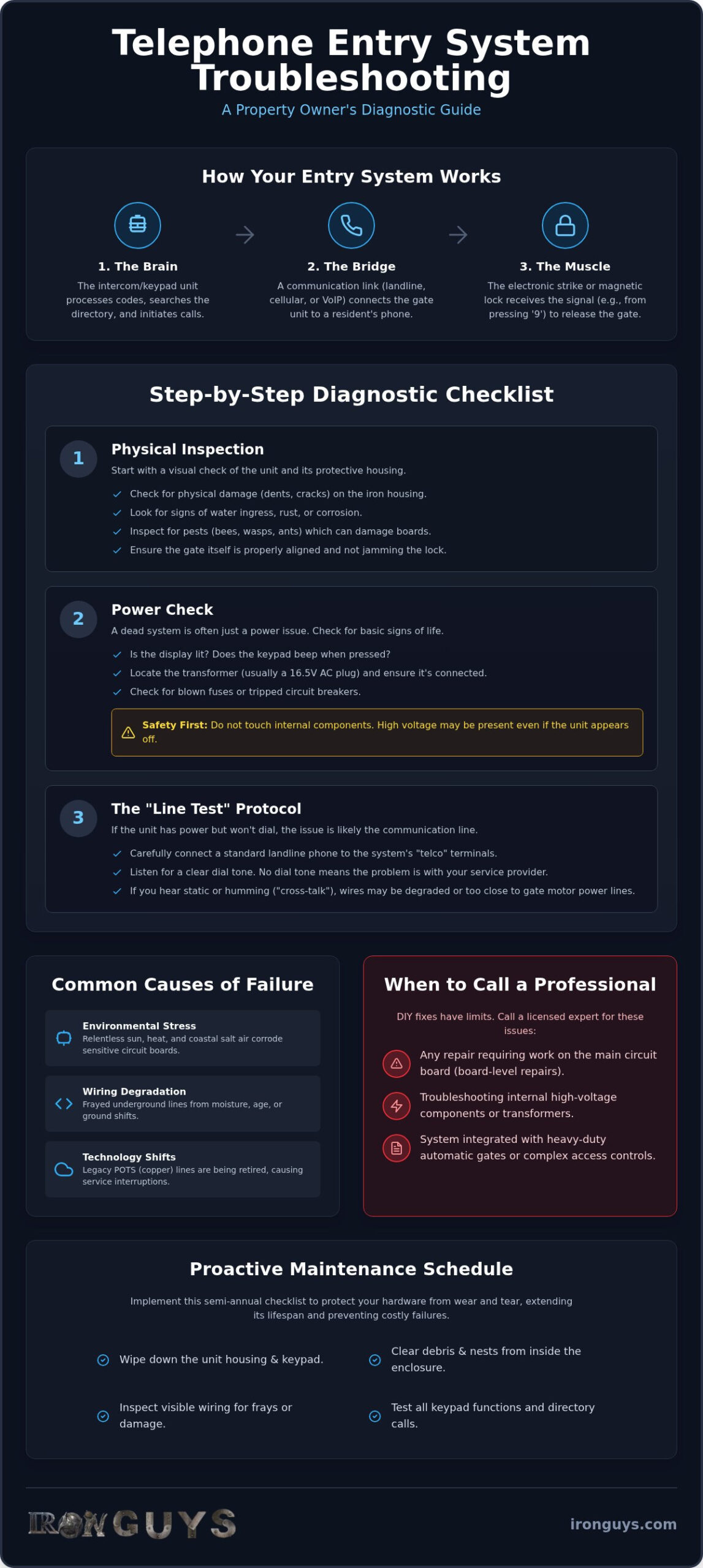
The keypad or intercom unit acts as the brain of the operation, processing codes and directory searches. Behind the scenes, the telephone line bridge connects the unit to your phone. Finally, the strike or actuator is the physical muscle. This mechanism releases the lock on your gate. If any part of this chain breaks, the whole system becomes a paperweight.
Common Symptoms of a Failing System
A dead display or unresponsive buttons usually indicate a power surge or a blown fuse. If you hear excessive static or a constant hum on the audio line, you’re likely dealing with wiring interference or poor grounding. One of the most frustrating issues is when the system calls the resident, but pressing the ‘9’ key fails to trigger the gate. This often points to a relay failure or a signal mismatch between the phone line and the entry controller.
Isolating the Problem: Hardware, Software, or Telephone Line?
To fix a broken gate, you first have to find the break. It’s usually a game of elimination. If your unit’s display lights up and accepts codes but refuses to dial out, your hardware is likely fine. In this scenario, the failure point is almost certainly the communication line. Conversely, a dark screen or a keypad that doesn’t beep indicates a hardware or power failure. This telephone entry system troubleshooting guide is designed to help you separate these variables quickly before you spend money on parts you don’t need.
Start with a physical inspection of the iron housing. Look for signs of water ingress, bee nests, or physical tampering. In Los Angeles, heavy-duty ironwork protects the “brains” of your system, but even the best enclosures can be compromised by vehicle impacts or attempted break-ins. If the metal casing is dented, the internal circuit boards might have shifted or cracked. Ensuring your setup meets official access control standards requires both digital precision and physical durability. If the housing is breached, the electronics inside won’t last another season.
The ‘Line Test’ Protocol
If the hardware looks solid, check the line. You can test this by connecting a standard landline phone to the system’s “telco” terminals. If you don’t hear a clear dial tone, the problem belongs to your service provider. Watch out for “cross-talk,” which sounds like faint voices or static. This happens when communication wires run too close to high-voltage gate motor lines. We’re seeing more property owners switch to cellular bridges in LA because they bypass aging copper infrastructure entirely.
Power and Surge Protection
Don’t assume a dead system needs a full replacement. Check the transformer first. Most systems use a 16.5V AC transformer plugged into a nearby outlet. Use a multimeter to verify it’s outputting steady power. LA’s grid can have spikes during heatwaves, which often blow the small glass fuses inside the control cabinet. Replacing a five-cent fuse is a lot cheaper than a new motherboard. If the system works but resets when the gate moves, your backup battery is likely dead and pulling too much current from the transformer.
Sometimes the hardware is perfect, but the data is gone. If names have vanished from the directory or codes no longer work, a power surge may have corrupted the memory. If you’re unsure about poking around a live motherboard, it might be time to have professional intercom systems experts take a look at the internal logic.
Step-by-Step Diagnostic Checklist for Property Owners
Before you call for a service truck, follow a systematic approach to identify the failure. This telephone entry system troubleshooting guide helps you rule out minor glitches that don’t require a professional. Safety remains your top priority. Never touch internal high-voltage wiring or attempt to bypass safety sensors without proper training. Most systems operate on low voltage, but the power supplies feeding them are a different story. If you see charred components or smell ozone, stop immediately and close the cabinet.
Start by documenting what the system is telling you. Modern units use specific beep patterns or LCD messages to signal trouble. A “Line Fail” message is self-explanatory, but a series of rapid beeps might indicate a stuck key or a memory error. Following access control best practices means keeping a log of these error codes. This data is invaluable for a technician if the problem persists. Also, be wary of the “Master Reset” myth. While a reboot can clear temporary software hangs, factory resetting your unit without a backup can wipe your entire resident directory, turning a minor repair into a data recovery nightmare.
Visual and Physical Inspection
- Step 1: Check the keypad for stuck buttons. In dusty Los Angeles environments, grit can wedge behind the keys, causing the system to think a button is constantly pressed.
- Step 2: Inspect the gate’s magnetic lock or strike. If the ironwork has shifted due to heat expansion, the strike might be under too much pressure to release.
- Step 3: Look for frayed or pinched wires at the hinge point of automatic gates. Constant movement can eventually break even the highest quality cabling.
Operational Testing
- Step 4: Call multiple numbers in the directory. If only one resident can’t receive calls, the problem is likely their specific phone carrier, not your entry system.
- Step 5: Use the internal bypass switch if available. If the gate opens with the manual switch but not the keypad, the relay or the keypad itself is the culprit.
- Step 6: Listen for the relay “click” when a code is entered. If you hear the click but the gate doesn’t move, your entry system is working fine. The problem lies with the gate motor or its power source.
By the time you finish this checklist, you’ll know exactly where the breakdown occurs. This prevents you from paying for a new intercom when you actually just need a gate hinge adjustment or a simple wiring repair. If the relay clicks and the lines are clear but the gate stays shut, you’ve reached the limit of DIY fixes.
When DIY Fixes Fail: Professional Repair and LA Standards
Sometimes, even the most detailed telephone entry system troubleshooting guide reaches its limit. When your diagnostics point to a fried motherboard or a high-voltage short, it’s time to step back. Board-level repairs involve delicate soldering and circuit tracing. These can easily ruin an expensive unit if mishandled. In Los Angeles, the combination of intense heat and coastal salt air creates unique corrosion patterns. These require professional-grade cleaning and sealing to prevent future failures. Attempting a ‘handyman’ fix often leads to improper grounding. This can instantly void your security solutions warranty.
Professional repair isn’t just about swapping parts. It’s about understanding the synergy between heavy-duty iron and sensitive electronics. If your gate is out of alignment, it puts physical stress on the electronic strike. A specialized technician knows how to adjust the custom metalwork while recalibrating the software. This ensures your system meets the UL 325 safety standards required for all automated entry points in California. We prioritize durability because a secure perimeter is only as strong as its weakest connection.
Advanced Diagnostic Tools the Pros Use
Technicians use tools that go far beyond a standard multimeter. Oscilloscopes allow us to see ‘noise’ on the phone line that causes dropped calls or audio interference. Time-Domain Reflectometers (TDR) help us find the exact spot of an underground wire break without digging up your entire driveway. We also use proprietary programming software for industry leaders like DoorKing and Linear to restore corrupted databases. This level of precision is critical when testing the integration between the intercom and apartment intercom systems across large multi-family complexes.
Local LA Compliance and Safety
Los Angeles has strict requirements for emergency access that a DIYer might overlook. If your system fails, the Fire Department must still be able to enter via a Knox Box or emergency override. A professional installation ensures these fail-safes are integrated correctly. ADA compliance is another major factor. This means making sure keypads are at the correct height and visible for all users in commercial settings. Using a licensed contractor isn’t just about the repair; it’s about liability protection for the property owner. If you’ve exhausted the steps in this telephone entry system troubleshooting guide and the gate still won’t budge, it’s time to bring in the experts. For reliable service that stands up to the LA elements, contact our security integration team today.
Securing the Perimeter: Long-Term Maintenance and Upgrades
Maintenance is the difference between a system that lasts thirty years and one that dies in five. Emergency repairs are expensive, stressful, and leave your property wide open. A semi-annual schedule keeps your hardware running smoothly and your security tight. This telephone entry system troubleshooting guide has shown you how to fix immediate issues, but true reliability comes from stopping failures before they start. Cleaning keypads and lubricating strikes prevents the grit of Los Angeles from grinding your electronics to a halt. Dust from the valley and salt from the coast are silent killers for exposed circuitry.
Knowing when to stop repairing is just as important as knowing how to fix a glitch. We recommend the ‘Rule of 50’ for property managers. If a single repair costs more than 50% of a new system’s value, or if your hardware is over a decade old, an upgrade is the smarter investment. Modernizing your entry doesn’t mean you have to lose your aesthetic. We specialize in integrating smartphone access and cloud-based management with your existing custom iron gate. This allows you to grant access from anywhere in the world while maintaining the heavy-duty physical barrier that protects your residents.
The Iron Guys Maintenance Protocol
Our protocol starts with the physical foundation of your security. We regularly inspect the integrity of the security iron fence surrounding the entry unit to ensure no shifting has occurred. Moisture is a constant threat, especially after heavy winter rains that can seep into poorly sealed housings. Preventative maintenance is the scheduled inspection and cleaning of your entry hardware to prevent catastrophic failure and extend the functional life of your security investment. We check every seal and tighten every terminal to ensure your system remains weather-tight and responsive.
Future-Proofing Your Access Control
The industry is moving away from analog. As telecommunications companies retire copper lines, transitioning to cellular or IP-based systems is no longer optional for reliable service. These modern bridges offer crystal-clear audio and faster response times. Adding video capabilities to your custom phone entry system provides an extra layer of visual verification that traditional audio-only units lack. It’s about building a system that is as smart as it is rugged. Ready for a rugged, reliable system? Contact Iron Guys for a professional security consultation.
Restore Your Property’s Security Today
A malfunctioning gate is a risk you can’t afford to ignore. This telephone entry system troubleshooting guide has equipped you to identify the difference between a simple line glitch and a critical hardware failure. You now know that physical durability is just as important as electronic precision. Whether you’re dealing with a stuck keypad in the San Fernando Valley or a corroded strike near the coast, the right diagnosis saves you time and money. Security requires a balance of rugged ironwork and perfectly calibrated tech.
When DIY checks aren’t enough, you need a partner who understands both the metal and the motherboard. We’ve spent over 25 years as licensed and bonded local artisans, blending custom iron fabrication with advanced electronic access integration. We don’t just patch problems; we build heavy-duty security solutions that stand up to the LA elements. Don’t leave your perimeter vulnerable to guesswork. Secure your property with Iron Guys’ expert entry system services. Your peace of mind is our highest priority, and we’re ready to get your gates moving again.
Frequently Asked Questions
Why is my telephone entry system not calling out?
Your system likely has a dead communication line or a service provider outage. Traditional copper lines are being phased out across California, which often causes legacy units to stop dialing without warning. You should first verify the dial tone at the terminal block to see if the issue is the provider or the internal circuit board.
How do I reset my DoorKing or Linear entry system?
You can perform a basic reset by power cycling the unit. Disconnect the 16.5V AC transformer and pull the backup battery for sixty seconds before reconnecting everything. Be careful not to trigger a factory reset through the keypad, as this will wipe your entire resident directory and all custom programming data.
Can I use a cell phone with my building’s telephone entry system?
Yes, most modern systems work perfectly with cell phones through cellular bridges or IP connections. If your system still relies on an old analog landline, it might struggle to communicate with modern mobile networks. Upgrading to a cellular-based bridge allows residents to grant access directly from their smartphones regardless of their location.
Why does my gate intercom have so much static?
Static is usually caused by electrical interference or moisture in the wiring. If communication wires are run too close to high-voltage gate motor lines, you’ll hear a persistent hum or crackle. This telephone entry system troubleshooting guide recommends checking all wire splices for corrosion or dampness inside the protective iron housing.
What should I do if the ‘9’ key doesn’t open the gate?
This issue often stems from the system failing to recognize the DTMF tone from your phone. If the system calls you but won’t trigger the gate, check if your phone’s touch-tone length is set to “long” in your settings. If you hear the relay click inside the unit but the gate doesn’t move, the relay or the gate motor itself is likely the problem.
How much does it cost to repair a telephone entry system in Los Angeles?
Repair costs vary based on the failure’s complexity and the required replacement parts. A simple fuse replacement or wire splice is less intensive than a full motherboard swap or a cellular bridge upgrade. Local labor rates and the age of your hardware will influence the final total. A professional diagnostic is the best way to get an accurate figure for your specific setup.
Is my entry system covered under my property insurance?
Coverage typically depends on the cause of the failure. Most property insurance policies cover sudden damage from vandalism, lightning strikes, or vehicle impacts but exclude normal wear and tear. You should review your specific policy to see if electronic security hardware and custom ironwork are listed under your property’s exterior improvements.
Can I install a telephone entry system myself?
We don’t recommend DIY installation for high-security access points. Proper installation requires knowledge of high-voltage power, low-voltage communication, and UL 325 safety standards. Incorrectly wiring a system can create fire hazards or leave you liable if the gate fails to function correctly during an emergency override situation.