
Your guest is sitting at the gate. They’ve called. The system buzzed. Nothing opened. Now they’re texting you, you’re texting the management company, and nobody has a clue what went wrong. Sound familiar? Troubleshooting a phone entry system feels like chasing a ghost when you don’t know where to start, and the fear of an expensive repair call makes it worse.
Here’s the truth most people miss: phone entry failures are rarely a software glitch sitting in isolation. They’re almost always a breakdown in communication between your electronic access controls and the physical gate hardware behind them. A misaligned gate, a corroded connection, a relay that’s lost its signal, these mechanical and electronic worlds are tightly linked. When one slips, the other fails.
We get it. A locked-out resident or a stalled delivery is a real problem that needs a real answer, fast. This guide walks you through the most common causes of phone entry system failures, the fixes you can handle yourself, and the clear signals that tell you it’s time to call in a professional. By the end, you’ll know exactly where the problem lives and what to do about it.
Key Takeaways
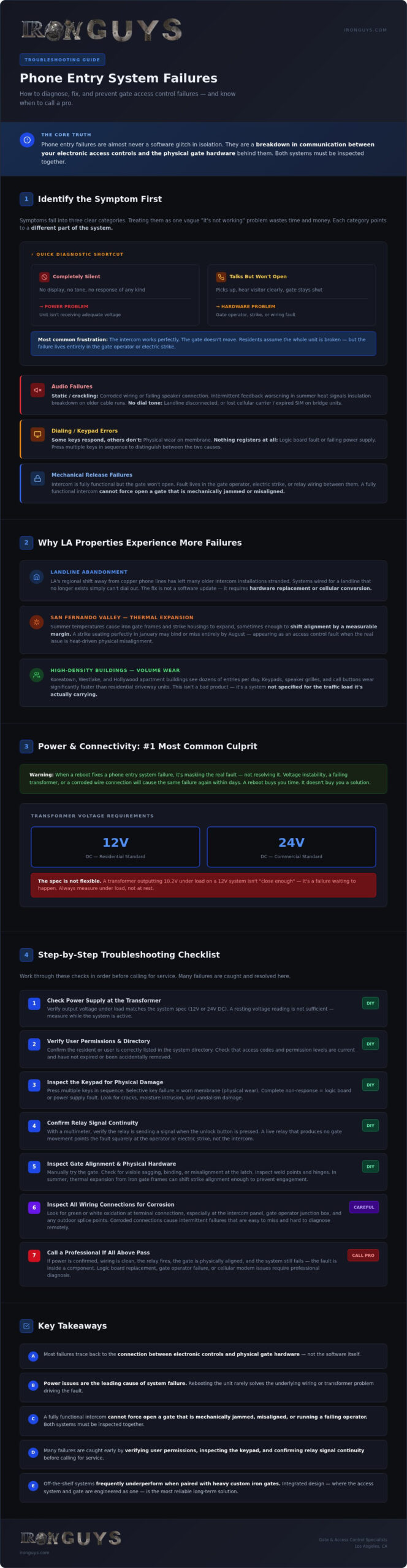
- Troubleshooting phone entry system failures starts with understanding that most problems trace back to the connection between your electronic controls and the physical gate hardware, not the software itself.
- Power issues are the leading cause of system failure, and simply rebooting the unit rarely solves the underlying wiring or transformer problem driving the fault.
- A fully functional intercom cannot force open a gate that is mechanically jammed, misaligned, or running a failing operator, so both systems must be inspected together.
- Many failures can be caught early with a simple checklist, including verifying user permissions, inspecting the keypad for damage, and confirming relay signal continuity before calling for service.
- Off-the-shelf entry systems frequently underperform when paired with heavy custom iron gates, making integrated design, where the access system and the gate are engineered as one, the most reliable long-term solution.
Troubleshooting Phone Entry System Failures: Identifying the Symptoms
A phone entry system does one job: it bridges the gap between a visitor standing at your gate and the person who can let them in. Dial tone connects them. A relay signal triggers the latch or operator. The gate swings open. When any link in that chain breaks, the whole system looks broken, even if only one component has actually failed. Knowing which link snapped is where troubleshooting phone entry system problems has to begin.
Symptoms fall into three clear categories: audio failures, dialing errors, and mechanical release failures. Each category points to a different part of the system. Treating them as one vague “it’s not working” problem is the fastest way to waste time and money.
Here’s the diagnostic shortcut most technicians use. A completely silent system almost always points to a power problem. No display, no tone, no response of any kind means the unit isn’t receiving adequate voltage. A system that talks, that picks up, that lets you hear your visitor clearly, but still won’t open the gate, points to hardware. The intercom is alive. The release circuit isn’t.
That second scenario is the number one source of frustration on LA properties. The system works. The gate doesn’t move. Residents assume the whole unit is broken. Often, the intercom is doing its job perfectly, and the failure lives entirely in the gate operator, the electric strike, or the wiring between them.
Common Signs of System Malfunction
Recognizing the specific symptom narrows the diagnosis fast. Watch for these:
- No dial tone: On older landline-connected systems, a missing dial tone often means the telephone line itself has been disconnected or degraded. On cellular bridge units, it typically signals a lost carrier signal or an expired SIM account, not a hardware failure in the intercom itself.
- Keypad unresponsiveness: A keypad that registers no input could be a worn membrane from daily use, or it could be a logic board fault. Press multiple keys in sequence. If some respond and others don’t, it’s physical wear. If nothing registers at all, suspect the board or the power supply feeding it.
- Audio static or feedback loops: Consistent crackling usually points to corroded wiring or a failing speaker connection. Intermittent feedback that worsens in summer heat often signals environmental interference or insulation breakdown on older cable runs.
Why Modern LA Properties Experience Entry Issues
Los Angeles presents a specific set of challenges that accelerate system failures. The regional shift away from landlines has left many older intercom installations effectively stranded. Systems wired for a copper phone line that no longer exists simply can’t dial out, and the fix isn’t a software update; it’s a hardware replacement or cellular conversion.
In the San Fernando Valley, thermal expansion is a real mechanical problem. Summer temperatures cause iron gate frames and strike housings to expand, sometimes enough to shift alignment by a measurable margin. A strike that seats perfectly in January may bind or miss entirely by August, making the gate appear to have an access control fault when the real issue is physical misalignment driven by heat.
High-density apartment buildings in neighborhoods like Koreatown, Westlake, and Hollywood face a different pressure: volume. An intercom panel that handles dozens of entries per day wears its keypad, speaker grille, and call buttons significantly faster than a residential driveway unit. Wear-related failures in these environments aren’t a sign of a bad product; they’re a sign that the system wasn’t specified for the traffic load it’s actually carrying.
Power and Connectivity: The Most Common Culprits
Cycling the power is the first thing everyone tries. Unplug it, wait ten seconds, plug it back in. Sometimes it works. Here’s the problem: when a reboot fixes a phone entry system failure, it’s masking the real fault, not resolving it. Voltage instability, a failing transformer, or a corroded wire connection will cause the same failure again within days. The reboot bought you time. It didn’t buy you a solution.
Start at the transformer. Most residential phone entry systems require either 12V or 24V DC, and the spec is not flexible. A transformer outputting 10.2V under load isn’t “close enough.” It’s insufficient. Voltage drops under demand are the signature of an aging or undersized transformer, and they produce symptoms that look like software glitches: intermittent display failures, missed dial attempts, and relays that click but don’t hold. Test at the unit’s terminal block while the system is active, not while it’s idle. That’s the number that tells the truth.
Don’t overlook the backup battery. Many installers and property managers do. A depleted or failed battery creates logic errors even when mains power is present, because the control board uses the battery as a reference voltage buffer. A board reading conflicting voltage signals from two sources behaves erratically. It’s not a programming fault. It’s a dead battery causing confusion at the hardware level.
Diagnosing Power Supply and Wiring Faults
A multimeter is the right tool for troubleshooting phone entry system wiring issues. Measure voltage at the power source, then again at the gate station terminal block. Any drop greater than one volt across that wire run signals resistance from corrosion, an undersized gauge, or a damaged splice. Underground conduit runs in coastal LA neighborhoods like Playa del Rey or Marina del Rey are especially vulnerable. Salt air migrates into conduit over time, and corroded conductors don’t fail all at once; they degrade gradually, producing voltage drops that worsen with heat and humidity.
One wiring habit that creates persistent problems is daisy-chaining the intercom’s power supply with cameras or other security devices. Each device draws current. Shared circuits that were sized for one load become undervoltage circuits when a second or third device is added. Keep the entry system on a dedicated circuit.
Network and Cellular Signal Interference
Cellular bridge units introduce a different failure category entirely. Signal strength and data throughput are not the same thing. A unit showing three bars of LTE signal may still fail to complete a call if the carrier’s local tower is congested or if the SIM account has lapsed. Carrier-side SIM updates, which happen without notification, can also break authentication on older bridge hardware. Check the SIM account status before assuming the hardware is at fault.
Wi-Fi dependent units have their own vulnerability. Wet concrete and saturated soil near a driveway apron change the RF propagation characteristics between the gate station and the router. A system that connects reliably in dry conditions may drop off entirely after heavy rain. If your gate loses connectivity seasonally, the antenna placement or a dedicated access point closer to the gate is the fix, not a router upgrade inside the house.
If you’re dealing with persistent connectivity or power faults on a property with custom ironwork, the gate itself may be part of the problem. Heavy iron frames create grounding interference that off-the-shelf systems aren’t designed for. Integrated gate and access system design eliminates that conflict from the start.
Mechanical Integration: When the Gate Hardware Fails the Electronics
Here’s the chain: your visitor presses the call button, you answer, you press the release tone, and the intercom sends a low-voltage relay signal to the gate operator. That signal is a trigger, nothing more. It tells the operator to act. What happens next depends entirely on the mechanical condition of the gate itself. A perfectly healthy intercom cannot force open a driveway gate that’s jammed, misaligned, or running a failing motor. The electronics did their job. The hardware didn’t.
This is the gap that most troubleshooting phone entry system guides completely miss. They treat the intercom and the gate as separate problems. They aren’t. They’re one system, and a failure in the mechanical half looks identical to a failure in the electronic half until you know where to look.
The first diagnostic split to make is between a lock failure and a motor failure. A lock failure means the release mechanism, the strike or the latch, isn’t disengaging even though it received the signal. A motor failure means the operator received the signal and the lock released, but the gate still won’t move. Both present as “gate won’t open.” The fix for each is completely different.
Electric Strikes vs. Magnetic Locks
Listen for the click. When you send the release tone, an electric strike should produce an audible click as the solenoid fires. If you hear the click but the gate stays shut, the latch is mechanically bound, not electronically failed. The strike did its job. The latch housing is misaligned, corroded, or physically obstructed. On custom heavy-duty iron gates, standard residential strikes are often undersized for the load pressing against them. A gate carrying significant weight needs a high-pressure strike rated for that force; a consumer-grade unit will click every time and hold the gate shut every time.
Magnetic locks present a different problem. No moving parts means no click to listen for. Check plate alignment first. Even a few millimeters of gap between the armature plate and the maglock body drops holding force dramatically and can prevent a clean release. Also check for residual magnetism after power is cut; a maglock that stays partially engaged after the release signal points to a failing coil or a wiring fault keeping voltage on the circuit.
Physical Gate Obstructions and Alignment
Sagging hinges are a chronic issue on iron gates. Over time, the weight of a heavy custom frame pulls the hinge side down, shifting the latch point out of alignment with the strike plate. The intercom fires the signal. The strike releases. The latch misses. When troubleshooting phone entry system failures on older iron installations, check hinge condition before touching any wiring.
Also check the basics:
- Track debris: Gravel, leaves, and sediment buildup in a slide gate track create enough resistance to stall an operator that’s otherwise functioning correctly.
- Photo-eye sensors: A misaligned or dirty photo-eye will hold a gate closed as a safety measure. The system isn’t broken; it’s doing exactly what it’s designed to do.
The manual release test settles the question fast. Disengage the operator and try to move the gate by hand. If it moves freely, the problem is electronic. If it resists or binds, the problem is mechanical. That single test tells you which direction to go before you spend an hour chasing wiring.
A Step-by-Step Troubleshooting Checklist for Property Owners
Before you call a technician, work through this sequence. Troubleshooting phone entry system failures in a logical order saves you time, money, and the frustration of a service call that diagnoses something you could have caught yourself in ten minutes.
Step 1: Verify user permissions and code expiration. Open your management software and confirm the affected user’s entry code is active, not expired or accidentally deactivated. Temporary codes issued to contractors or delivery services are a common culprit. They expire, the resident assumes the system broke, and the fix is a 30-second update in the admin panel.
Step 2: Inspect the keypad and camera lens visually. Look for cracked buttons, debris packed into the keypad membrane, or a camera lens obscured by grime or vandalism. A lens coated in dust doesn’t just impair video; it can scatter infrared and trigger false proximity errors on smart units.
Step 3: Test with multiple phone numbers. Call the gate from your cell, then from a landline, then ask a neighbor to try their carrier. If one number connects and another doesn’t, the problem is carrier-specific routing, not the entry system itself. Cellular bridge units are particularly sensitive to carrier-side changes that happen without any notification to the property owner.
Step 4: Inspect the gate physically. Push it by hand with the operator disengaged. Check for hinge resistance, frame binding, or track obstruction. As covered earlier, a mechanically compromised gate presents identically to an electronic failure until you test it manually.
Step 5: Check the circuit breaker and the panel’s internal fuse. A tripped breaker is obvious. A blown internal fuse is less so. Most entry panels have a small glass or blade fuse on the control board itself. A visual inspection takes thirty seconds and rules out a simple protection fault before you dig deeper.
Basic User and Programming Checks
Check whether the “Hold Open” command is active. It’s a legitimate feature that’s easy to trigger accidentally, and it will hold a gate open or locked in a fixed state regardless of what the intercom does. Also audit your resident directory. Outdated entries with stale phone numbers create processing lag on older systems with limited memory buffers, producing sluggish response times that look like hardware faults. If your system uses a companion app, clear the cache and confirm the firmware is current. App-side bugs on outdated versions frequently cause failed release commands that the panel itself never actually receives.
Environmental Maintenance for LA Coastal Air
Properties within a few miles of the coast face accelerated corrosion on every exposed contact point. Clean salt spray residue from terminal connections and wiring junctions with a non-conductive electronics cleaner; never use water or compressed air alone, as both push contaminants deeper into the contact surface. Lubricate iron hinges and latch mechanisms on a regular schedule. A gate that swings freely puts minimal load on the relay and operator; a gate fighting corroded hinges stresses every component in the release chain. Use a non-conductive cleaner specifically rated for keypad surfaces to avoid damaging the membrane or leaving a residue that attracts more debris.
If your property combines custom ironwork with an access system that wasn’t designed for it, maintenance alone won’t close the performance gap. Talk to Iron Guys about integrated gate and entry system solutions built for the specific demands of Los Angeles properties.
Integrated Security: The Iron Guys Approach to Reliable Access
Off-the-shelf phone entry systems are engineered for average conditions. Standard gate weights. Standard frame tolerances. Standard installation environments. Custom heavy iron gates are none of those things. When you bolt a consumer-grade intercom onto a several-hundred-pound custom iron frame, you’re pairing hardware that was never designed to work together. The result is exactly what property owners describe: a system that works intermittently, degrades faster than it should, and requires constant troubleshooting phone entry system issues that a properly integrated setup would never produce.
Iron Guys has been building custom metalwork and integrated access systems in Los Angeles since 1998. That history matters because it means we’ve seen what happens when the gate and the entry system are treated as separate purchases. They’re not. They’re one system. We design them that way from the start.
The Benefit of Custom Metalwork and Integrated Access Control
Southern California sun is brutal on electronics. UV exposure and sustained heat degrade plastic housings, warp keypad membranes, and accelerate corrosion on exposed terminals. When we design a gate housing for a security solution, the intercom enclosure is part of that design. Shielded from direct sun exposure. Ventilated to prevent heat buildup. Built from the same quality iron as the gate itself, not an afterthought bracket from a hardware store.
Structural vibration is a real problem most installers ignore. A heavy swing gate generates significant force through its frame every time it opens and closes. Entry panels mounted without proper isolation work loose over time. Connections vibrate free. Circuit boards develop micro-fractures. We engineer the mounting to absorb that operational load, so the electronics stay seated and stable through years of daily use. Aesthetics follow function. Every panel integration is matched to the design language of the custom ironwork surrounding it, so the finished installation looks deliberate, not retrofitted.
Professional Installation and Local Support in Los Angeles
Proper grounding and conduit work prevent the majority of long-term access failures. This isn’t opinion; it’s what two-plus decades of installs across hillside properties, coastal estates, and high-density apartment buildings have confirmed. A licensed installation with correctly sized conduit, sealed junction points, and dedicated circuits doesn’t need constant attention. A rushed DIY install does.
Retrofitting modern phone entry systems into existing iron gates requires more than running new wire. It requires understanding how the existing frame was built, where the structural anchor points are, and how the gate’s movement pattern affects every component attached to it. Our team handles that assessment before a single conduit is cut.
We’re LA-based. We know hillside soil movement. We know coastal salt migration. We know what a San Fernando Valley summer does to iron and electronics alike. That local knowledge isn’t something a national provider can replicate.
Don’t let a faulty system compromise your security or your peace of mind. Contact Iron Guys to discuss integrated gate and access control solutions built specifically for your property.
Stop Chasing the Problem. Fix It for Good.
A phone entry system failure is never just one thing. It’s power, wiring, mechanical alignment, and software all working together, or failing together. Troubleshooting phone entry system issues the right way means checking each layer in sequence: confirm power first, then connectivity, then the physical gate hardware. That order saves time and prevents misdiagnosis.
Two things determine whether your system stays reliable long-term. The first is proper installation, with dedicated circuits, sealed conduit, and correctly matched components. The second is integration: a gate and an access system designed to work as one, not bolted together after the fact.
Iron Guys has been doing exactly that across Los Angeles since 1998. Licensed professionals. Custom ironwork paired with leading access control systems. Local expertise that national providers simply can’t match.
Don’t keep patching a system that was never built right. Secure your property with a reliable, professionally installed phone entry system from Iron Guys and get the peace of mind that comes with knowing the job was done properly from the start.
Frequently Asked Questions About Phone Entry System Failures
Why does my phone entry system work for some people but not others?
This is almost always a carrier routing issue, not a hardware fault. Phone entry systems dial out through a specific telephone number or cellular bridge, and certain carriers route calls differently. A Verizon number might connect cleanly while a T-Mobile number times out, or vice versa. Test calls from multiple carriers before assuming the system itself is broken.
User-level permission settings are the other common cause. Check your admin panel and confirm that each affected resident’s directory entry is active, the associated phone number is current, and no access restrictions are applied to their profile. A single digit entered incorrectly during setup will silently block calls for that user while everyone else connects without issue.
Can I fix a phone entry system that was damaged by a power surge?
It depends on where the surge damage landed. If the surge hit the control board, replacement is almost always the right call; board-level repairs are rarely cost-effective on entry system hardware. If the damage is limited to the transformer or a fuse, those components are straightforward to replace. Start by testing the transformer output and inspecting the panel’s internal fuse before assuming the entire unit is beyond saving.
Surge protection on the dedicated circuit feeding your entry system isn’t optional in LA. Voltage spikes from grid fluctuations and nearby lightning strikes are common enough that an unprotected installation is a question of when, not if. A properly rated surge suppressor at the panel costs far less than a control board replacement.
How do I reset my gate’s phone entry system after a power outage?
Most systems restore automatically once stable power returns. If yours doesn’t, locate the main power switch on the control panel, cut power completely for thirty seconds, then restore it. This forces a clean boot cycle rather than a partial restart from a degraded state. Check that the backup battery is still holding a charge; a depleted battery can prevent the board from completing its initialization sequence even when mains power is back.
After any extended outage, verify your system’s clock and any time-based access schedules. Many entry systems lose their time reference during a power interruption, which can cause scheduled unlock windows to misfire or access codes tied to specific hours to stop working. A two-minute check of the time settings prevents a lot of confusion after the power comes back on.
Is it possible to upgrade an old landline-based intercom to a cellular system?
Yes, and it’s one of the most practical upgrades available for older LA properties. Cellular bridge adapters connect to your existing intercom wiring and replace the copper phone line dependency with a SIM-based connection. The existing gate station, keypad, and wiring often stay in place. The adapter handles the translation between the old hardware and the cellular network, so you’re not necessarily replacing the entire system.
The key variable is whether your existing intercom hardware is compatible with the bridge unit you’re considering. Older systems with proprietary protocols sometimes don’t play well with third-party adapters. A technician familiar with both the legacy hardware and current cellular bridge options can tell you quickly whether a conversion is viable or whether a full replacement is the cleaner path forward.
Why is there static on my gate intercom when I try to talk to visitors?
Consistent static almost always points to a corroded wire connection or a failing speaker. Check the terminal connections at both the gate station and the control panel for oxidation, particularly on properties near the coast where salt air accelerates corrosion on exposed contacts. A connection that looks intact visually may have a thin oxide layer causing significant signal degradation.
Intermittent static that worsens in summer heat is a different problem. Heat causes insulation on older cable runs to soften and sometimes crack, creating intermittent shorts that produce crackling audio. If the static comes and goes with temperature changes rather than staying constant, the cable run itself is the likely culprit, not the speaker or the terminal connections at either end.
What should I do if the gate keypad is lit up but doesn’t respond to codes?
A lit display with no code response typically means the keypad membrane has failed or the logic board isn’t receiving input signals. Press each key individually and listen for any tactile or audible feedback. If some keys register and others don’t, physical membrane wear is the diagnosis. If no keys register at all, the problem is more likely at the board level or in the connection between the keypad assembly and the control board.
Before assuming hardware failure, check whether the system is locked in a programming mode. Some entry systems enter a locked state after a certain number of failed code attempts as a security measure, and the keypad will appear to function normally while rejecting all input. Consult your system’s manual for the specific lockout reset procedure, which usually involves a timed power cycle or a master reset code entered from a secondary access point.
How often should I have my phone entry system professionally serviced in LA?
An annual inspection is a reasonable baseline for most properties. That service visit should cover terminal connection cleaning, transformer output testing, battery condition check, relay function verification, and a physical inspection of the gate hardware the system interfaces with. Properties near the coast or in high-traffic apartment buildings benefit from a twice-yearly schedule given the accelerated wear those environments produce.
Don’t wait for a failure to schedule service. Troubleshooting phone entry system problems reactively, after a resident is already locked out, costs more in time and stress than a routine inspection. A technician catching a degraded transformer or a corroded splice during a scheduled visit fixes it before it becomes an emergency, and that’s the difference between a minor maintenance cost and an urgent service call.
Can heat in Los Angeles cause my phone entry system to malfunction?
It absolutely can. Sustained high temperatures affect phone entry systems in several ways. Electronic components operate within rated temperature ranges, and control boards in enclosures exposed to direct sun can exceed those limits during peak summer heat, producing erratic behavior that disappears once the unit cools down. If your system malfunctions consistently in the afternoon and recovers by evening, heat is the first thing to investigate.
The mechanical side is equally vulnerable. Thermal expansion shifts iron gate frames enough to misalign strike plates and latch housings, making a gate that seats perfectly in winter bind or miss entirely in August. Custom heavy iron gates are particularly susceptible because of the mass involved. Shaded enclosures for the entry panel and a properly engineered gate housing designed for Southern California conditions address both problems at the source rather than treating the symptoms season after season.