
A secure apartment entrance needs more than a buzzer. Telephone entry systems for apartments in Encino let visitors call residents from a shared panel, so residents can speak with them and remotely release a gate or door. The system can work as stand-alone entry control, with its connections and hardware selected for the property in Encino or nearby Tarzana.
This straightforward setup provides controlled access without making entry complicated. This guide explains how visitor calls work, what to consider when existing hardware is in place, and how an entry system can connect with automatic gates and cameras. You’ll also learn which property and access needs shape the setup, so you can assess how the components work together.
Key Takeaways
- A telephone entry system lets visitors call residents at the entrance, while video intercoms add a visual check and virtual doorman services use a different access model.
- Trace the visitor call from the entry panel to the resident’s phone and understand how the resident authorizes access.
- Assess existing wiring, entry hardware, and the gate or door operator to see what an installation can reuse.
- Plan how entry controls and cameras can work together to support access monitoring and event records.
- Compare stand-alone control options by the property’s entry points and resident-directory needs before choosing a setup.
What is a telephone entry system?
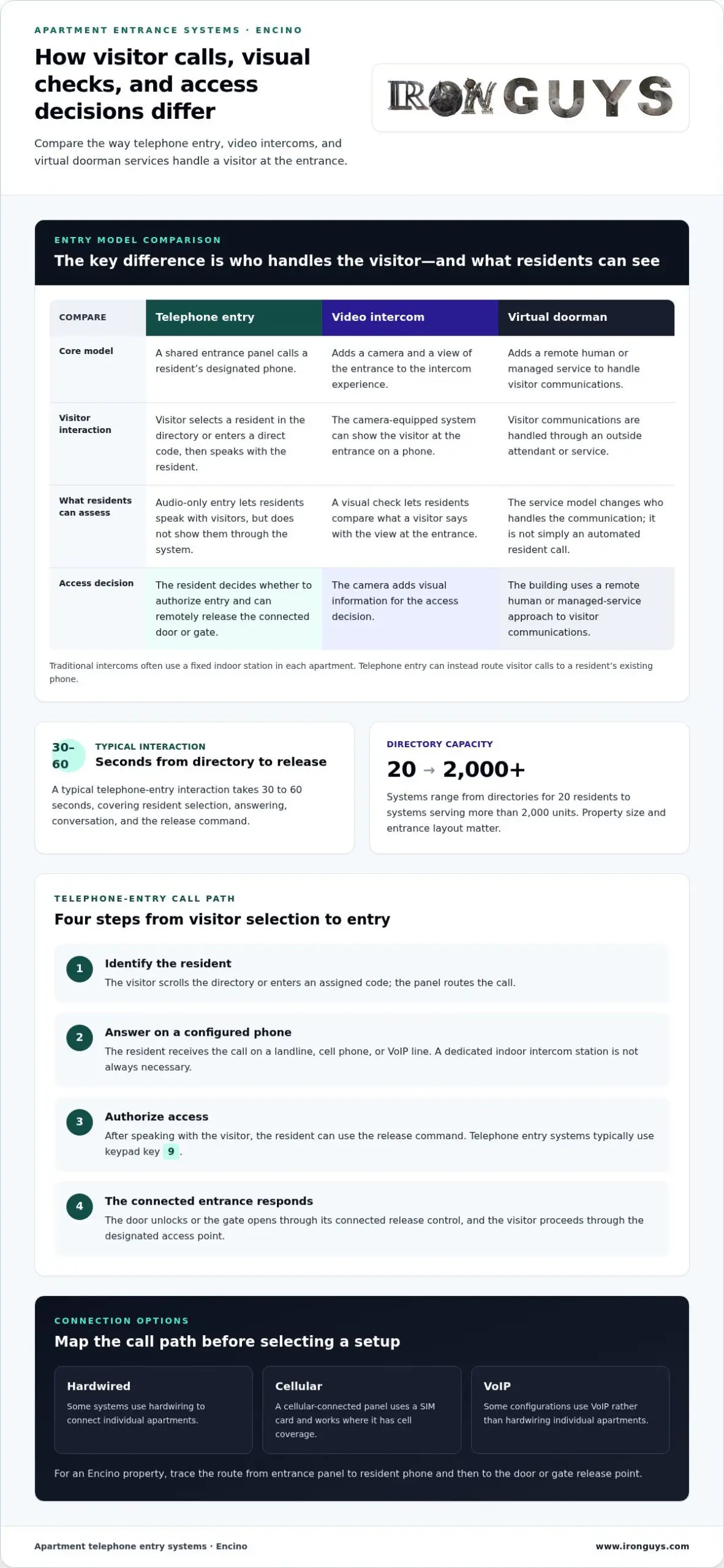
Telephone entry systems for apartments in Encino let visitors call residents from a shared entrance panel. A resident answers on a landline, cell phone, or voice-over-internet-protocol (VoIP) line, then remotely releases the door or gate. The panel typically includes a resident directory and call controls. Unlike a simple buzzer, it connects a visitor’s request with a resident’s phone and the entrance.
For properties in Los Angeles and California, include applicable building-code and accessibility requirements in the entrance design. Consider the approach to the panel, how residents and visitors operate it, and whether the project changes a door, gate, or access route. Requirements depend on the building and project scope, so don’t assume one setup suits every Encino property or nearby Beverly Hills apartment.
A traditional intercom often uses a fixed indoor station in each apartment. A telephone entry system can instead route visitor calls to a resident’s existing phone, potentially reducing reliance on unit-specific intercom wiring. The key difference is the call path: a visitor selects a resident in the directory, the system places the call, and the resident decides whether to grant entry.
Video intercoms add a camera and a view of the entrance. With audio-only telephone entry, residents can speak with visitors but can’t see them through the system. A camera-equipped entry system can show a visitor at the gate on a phone, helping residents make a more informed access decision. For example, a resident expecting a delivery can compare the caller’s explanation with the view at the entrance.
DoorKing telephone intercom systems are a named example in this product category. The key comparison isn’t brand alone. Review how the panel handles resident names, how calls reach residents, and how the system releases the property’s door or gate. Directory capacity ranges from 20 residents to systems serving more than 2,000 units, so the property’s size and entry layout matter.
A virtual doorman differs from a telephone entry system. Telephone entry automates the visitor call and resident-controlled release; a virtual doorman adds a remote human or managed service to handle visitor communications. The operating model differs: one relies on residents to answer, while the other may involve an outside attendant or service. Choose based on how the building wants visitor calls handled, not just the panel’s appearance.
For an Encino apartment building, map the entrance, resident directory, phone connection, and release point before comparing systems. This makes it easier to decide whether audio is enough, whether a camera would be useful, and how residents will receive calls. It also clarifies whether the property needs stand-alone telephone entry or a broader communications or access-management setup.
How telephone entry systems work
A visitor starts at the entrance panel by selecting a resident from the directory or entering a direct code. The panel calls the resident’s designated phone, which may be a landline, cell phone, or voice-over-internet-protocol (VoIP) line. The resident can speak with the visitor and decide whether to release the door or gate.
- Identify the resident. The visitor scrolls the directory or enters the assigned code on the keypad. The panel uses that selection to route the call.
- Answer the call. The resident receives it on the configured phone. The phone works as the answering device; a dedicated indoor intercom station isn’t always necessary.
- Authorize entry. The resident speaks with the visitor, then presses the system’s release command if access is appropriate. Telephone entry systems typically use keypad key 9 to release a gate or door.
- Complete the visit. The entrance unlocks or the gate opens through its connected release control. The visitor proceeds through the designated access point.
A typical telephone entry interaction takes 30 to 60 seconds. That window covers the visitor’s directory selection, the resident’s answer, the conversation, and the release command. A clear directory helps visitors find the right resident without calling the wrong apartment. In an Encino building, accurate names and call routing matter especially during deliveries and scheduled guest arrivals.
The connection between the panel and residents’ phones can be arranged in different ways. Some systems use cellular or VoIP service instead of hardwiring individual apartments. A cellular-connected panel uses a SIM card and works where it has cell coverage. This can suit a property where unit-by-unit wiring is difficult or resident calls need to reach mobile phones.
Before choosing a connection, map the panel’s location, resident call destinations, and entry release point. For example, a manager at a Santa Monica apartment building can confirm that a resident’s call reaches the intended phone and the release command operates the correct entrance. Test directory spelling and what happens when a resident doesn’t answer, too. These details show whether the call flow suits daily building operations.
Phone entry systems rely on a working path from visitor panel to resident phone and then to the gate or door control. A landline setup uses the phone service assigned to the system; cellular or VoIP configurations use their respective network connections. Understanding the chain helps property teams pinpoint whether a call problem starts at the panel, connection, resident’s device, or release control.
Installation timelines and reuse of existing hardware
Installation time depends on the entry layout, existing wiring, network connection, and condition of the gate or door hardware. A simple single-entry system replacement can take 1-2 days to install. That timeline describes a straightforward replacement, not every apartment project. Multiple entrances, damaged wiring, or changes to the release hardware can add work. In Encino, a site review should map each panel, call path, and controlled entry before equipment is selected.
For an Encino apartment building, look for a clear resident directory, reliable call routing, and compatibility with the existing gate or door release. Consider whether calls should reach landlines, mobile phones, or a VoIP network, and whether the system needs audio or video. The right features depend on residents’ needs, entrance capacity, and existing hardware.
Assess reuse by inspecting each component: the entry panel, its wiring, the phone or data connection, and the release mechanism. A door strike or gate operator must respond correctly to the entry system’s release signal. Existing parts may remain useful if their condition and connections suit the replacement design. Worn components or incompatible controls may need replacement rather than adaptation.
- Document the setup. Record every entrance, panel location, resident-directory format, and current call connection.
- Inspect the release path. Test how the existing strike, lock, or gate operator responds to an authorized release.
- Check network compatibility. Match the proposed system’s connection method with the property’s available phone, cellular, or VoIP service.
- Test after installation. Place sample calls, verify directory entries, and confirm each controlled entrance responds correctly.
DoorKing and other telephone-entry brands offer different panel designs and capacities. Compare the number of residents supported, directory operation, connection method, and compatibility with existing release hardware. Hardware costs vary by system type and components. Don’t compare panel prices alone, because a panel may not include every part needed for a working entrance.
Project expenses can include the entry panel and related hardware, installation labor, wiring or network changes, and recurring phone or connectivity service. The price depends on the project and is provided after a quote request. Key factors include the number of entrances, resident capacity, reuse of existing hardware, connection type, and any required gate or strike work. Recurring costs depend on the communications service and connection selected.
For a building in Encino, base the equipment decision on the actual entry path. A compatible panel is of little use if calls can’t reach residents or the release control can’t operate the entrance. Reviewing the panel, network, wiring, and strike together helps define the installation scope before work begins.
Integration with gate operators and security cameras
A telephone entry panel can connect with an automatic gate and security cameras as part of an access-control sequence. A visitor calls a resident, the resident authorizes entry, and the gate operator receives the release command. A camera can show the visitor at the gate on a phone, while connected systems can capture and log access events. Each connection must match the property’s gate controls and camera setup.
Plan the signal path before choosing equipment. Identify the entry panel, the gate operator’s control input, each camera view, and where event records are managed. Then test a complete visitor call: confirm the resident can see or hear the visitor, authorize access, and release the intended gate. This can reveal a mismatch between the panel and operator before residents rely on the system.
Phone-number porting matters when a building changes telephone service but wants to retain existing numbers. Porting transfers a number between service providers; it doesn’t establish that an entry panel will work on the new network. Map which numbers serve the panel and which belong to residents, then test call routing after any service change. At a multi-entrance Encino property, label each panel and its assigned line to prevent confusion.
Mircom is one brand property managers may encounter when comparing apartment entry equipment. Evaluate a specific Mircom system by its documented call method, directory capacity, release connection, and compatibility with the building’s existing gate and camera equipment. Don’t assume every model has the same integration options. Review the exact panel and connected devices, then test each intended function from start to finish.
Integration also raises security and privacy concerns. Limit directory and access-log permissions to authorized property staff, and decide how camera views and event records will be handled. Depending on the equipment and connection path, a power outage or failed network connection can interrupt calls, video, or electronic release. Encino managers should define an emergency entry procedure and confirm how residents and authorized responders can reach the property if electronic access is unavailable.
- Gate test: Place a visitor call and verify the correct operator releases the correct entrance.
- Camera test: Confirm the view shows the visitor’s approach and entry point clearly.
- Call test: Test each panel’s number and call routing after telephony changes.
- Failure plan: Document manual access steps for a power or network interruption.
A coordinated access-control system depends on clear connections between the panel, phone service, gate, and camera. Documenting those links helps property teams troubleshoot issues by checking the affected component rather than treating the whole system as one device.
Stand-alone telephone entry control
Stand-alone telephone entry handles visitor calls and entry release without requiring a larger access-control system. For an Encino apartment building, it can provide a focused way to manage a door or gate. The panel’s directory, call connection, and release hardware make up the working system. Its usefulness depends on how well those parts match the property’s entrances and residents’ access needs.
Start with the entrance count. Linear telephone entry models support 1, 2, or 36 doors, depending on the model. A property with one street entrance has different control needs from a building with separate vehicle and pedestrian gates. Identify each controlled door, then determine which panel functions apply to each entrance. This prevents selecting equipment around resident count alone.
Directory capacity is another key decision. Telephone entry directory panels range from 20 residents to systems serving more than 2,000 units. The panel must accommodate the building’s resident list and provide a workable way to maintain it. Consider how staff will add or remove names and update contact details as residents change. Clear programming keeps the directory aligned with current occupancy.
Some systems also use direct-entry codes. The DC-TEG1 stores a 4-digit direct-entry code for each resident. That offers another way to reach a resident without searching through names, but the property must manage code assignment and updates. Include the method in building procedures so authorized staff know how programming changes are handled.
- Map each entrance. Match the panel and door capacity to the doors or gates being controlled.
- Set directory requirements. Compare resident capacity with how staff maintain names and contact information.
- Plan programming. Define who updates resident entries and direct-entry codes when occupancy changes.
- Test each release point. Confirm the panel operates the intended entrance, not another connected door or gate.
Stand-alone control can suit a building that needs direct call-and-release functionality rather than a broad, integrated platform. It may be practical when the entrance layout is straightforward and resident communication needs are clear. More complex properties may need coordinated cameras, multiple entry points, or additional access-management functions. The system’s scope should reflect the building’s operations.
For an Encino property, consider controlled doors, directory capacity, and programming workflow together. A panel with ample capacity won’t solve a poor entrance layout, and even a simple setup needs accurate resident records. Treat the panel, connected release hardware, and management process as one access-control plan.
Iron Guys: Security iron fence
Iron Guys helps Encino property managers coordinate controlled entry with the physical perimeter. A security iron fence defines the property boundary, while an electric remote control gate manages vehicle access. Horizontal iron works can also create a cohesive look across the entrance.
Consider this approach when planning a new entry system alongside a gate or fence project, or when existing perimeter features need attention. The layout should suit the building’s access points and how residents and visitors use them.
Explore completed projects and customer reviews to see examples of the workmanship. Visit Iron Guys to learn more.
Plan a Connected Entrance Upgrade
When planning, look beyond the entry panel. Consider how residents, visitors, vehicles, and the property’s perimeter interact at the entrance each day. That perspective helps align telephone entry systems for apartments in Encino with the building’s wider access needs, rather than treating the panel as a stand-alone purchase.
Iron Guys can help with the physical elements of that plan, including a security iron fence, electric remote control gates, and automatic gates. Discuss the entry layout and the property’s priorities, especially if you’re planning access equipment and perimeter work together. A coordinated scope keeps design and installation decisions focused on how the property functions.
Explore completed projects and customer reviews, then visit the site to discuss your property’s needs.
A clear plan is a strong starting point for a more controlled, well-integrated apartment entrance.
Frequently Asked Questions
What types of telephone entry systems are available for Encino apartment buildings?
Encino buildings can choose audio telephone entry, camera-equipped entry, or stand-alone telephone control. Connection options include a phone line, cellular service, or VoIP. The best fit depends on whether residents need voice communication, visual visitor identification, or coordination with other access equipment. For example, a smaller building with one controlled entrance may prioritize straightforward calls, while a property with separate pedestrian and vehicle entrances may need a broader setup.
How much do apartment telephone entry systems cost to buy and install in Encino?
There isn’t one fixed cost for an Encino installation; the total depends on equipment and site work. A quote should account for the panel, resident capacity, number of entrances, connection method, wiring, and whether existing release hardware can be reused. Ask for the proposed scope to distinguish equipment, installation, and recurring communications expenses. This makes it easier to compare project plans without treating the panel’s price as the full installed cost.
Which telephone entry system brands and installers serve Encino, California?
DoorKing and Mircom are examples of telephone entry system brands. Iron Guys installs phone entry systems and apartment intercoms for local properties, including Encino. Compare the exact model with the building’s needs: directory management, call routing, gate or door release, and any camera integration. Brand recognition alone won’t show whether a particular system suits the property’s existing entrance and communications setup.
How do telephone entry systems connect to residents’ landlines, cell phones, or smartphones?
The system routes a visitor’s call to the resident’s selected phone destination. Depending on the configuration, that may be a landline, cell phone, or VoIP line. A resident can answer on a smartphone as a phone call, but that doesn’t automatically mean the system includes a dedicated app. For an Encino building, document which residents receive calls at which numbers, especially when households change phones.
What are the installation steps and typical timeline for an apartment entry system?
Installation generally starts with documenting entrances, resident call routing, and existing hardware, then selecting compatible equipment and completing installation and functional tests. A simple single-entry replacement can take 1-2 days to install. Larger jobs can involve additional coordination when entrances, wiring, or release hardware differ. Before work begins, prepare an updated resident directory and identify who will test calls and access release at each entrance.
How do telephone entry systems compare with video intercoms and keyless access systems?
Telephone entry centers on visitor calls and resident-authorized release. A video intercom adds a camera view, while keyless access can let authorized users enter with credentials rather than a visitor call. These approaches address different access needs and can be combined in some property plans. For example, an Encino building might use telephone entry for guests and a separate credential method for residents. Compare the daily entry process, not just panel features.
What ongoing phone, cloud, maintenance, and repair costs should apartment owners expect?
Ongoing expenses depend on the selected phone or network connection, any cloud-management service, and the condition of the installed equipment. Landline, cellular, and VoIP services can each have recurring charges. Maintenance and repair needs depend on the components requiring attention, such as the panel, wiring, camera, or gate release. Ask the project quote to distinguish installation work from continuing service expenses so the building can plan its operating budget.
How can an apartment building replace or upgrade an existing telephone entry system?
Start by documenting the current panel, resident directory, call connection, and each controlled entrance. Then identify needed changes, such as adding camera visibility, updating resident call destinations, or replacing unreliable hardware. The replacement plan should account for the gate or door release and the property’s network. After installation, test calls and access at every entrance, and ensure staff know how to update resident records.