
A locked gate controls entry, but it does not show who is waiting outside. A video intercom system for home security lets you see and speak with visitors before deciding whether to grant access. It combines video and audio communication with a way to manage entry at your property.
That added visibility can make a home’s entrance easier to screen and manage. The right setup depends on how you use the entrance, where you want to answer calls, and how the system will work with your gate and other access controls.
This guide explains how video intercoms work, what one-way and two-way communication means, and which features, monitors, integrations, installation choices, and cost factors matter. You’ll get a practical framework for evaluating a system for a home in Los Angeles or nearby communities such as Pasadena, Glendale, and Beverly Hills.
Key Takeaways
- Understand how video intercoms help you screen visitors and manage entry before deciding which setup suits your home.
- Consider where indoor monitors are most useful and how many locations need access to visitor calls.
- Compare wired and wireless installation approaches based on your property layout and existing connections.
- Look beyond upfront equipment costs to understand how subscriptions may affect ongoing expenses.
- Choose between one-way and two-way communication based on how you want to interact with visitors at the entrance.
Smart-home and access-control integrations
A connected intercom can link visitor communication with entry controls, helping residents assess requests before granting access. Its usefulness depends on which devices and entrances the system connects.
U.S. privacy and recording rules can depend on location and whether audio is captured, so one rule may not apply to every home. In Los Angeles, consider camera placement and audio use carefully, especially near shared spaces or neighboring properties.
Integration can connect a video intercom with a gate or other access-control equipment. For example, a resident can view a visitor, speak with them, then use the connected control to grant entry. Cloud-based systems can provide 24/7 monitoring of residential and commercial building entry points. Remote management can also help residents handle entry requests when they’re away, depending on the system’s setup and connected devices.
RFID key fobs use radio-frequency identification to communicate with a compatible reader. Residents can present a fob at an entrance instead of making an access request through the video screen. Different fobs can be assigned to authorized household members, while visitor access remains a separate decision. The key consideration is whether the fob reader and intercom work with the same access-control setup.
Remote Viewing and Recorded Footage
Remote viewing lets an authorized user access recorded video from an intercom system while away from the property. Footage can be played back on demand, helping residents or security staff review an entry event and assess an incident remotely. For example, after an unexpected gate opening, a resident can review the relevant footage instead of relying only on memory or a visitor’s account. Storage and playback options depend on the system.
Visitor and Delivery Entry
Visitor and delivery entry uses the intercom to identify someone at the entrance and manage whether they proceed. A resident can speak with a guest using live video and audio, then decide whether to release a connected gate. For a delivery, the resident can give instructions without treating the arrival as automatic permission to enter. This separates identifying a person from granting access, an important distinction for homes with controlled driveways or shared entrances. For larger multi-unit or commercial developments where vehicle queuing and site access require broader planning, transport consultancies like ML Traffic Engineers Australia help design safe and efficient driveway circulation.
Indoor monitor sizes and quantities
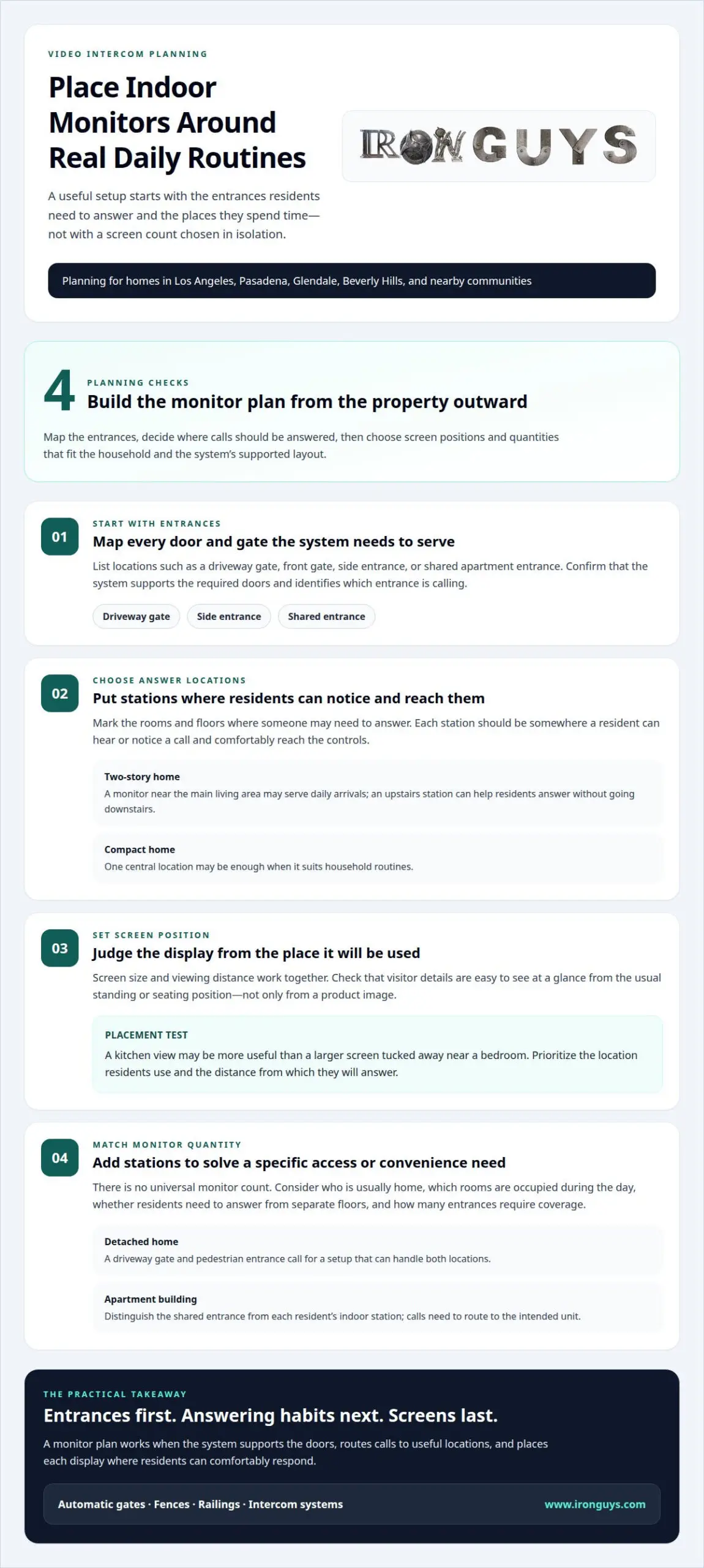
An indoor monitor puts the entrance view and visitor call within reach inside the home. Screen size matters, but so does placement: a clear view from the kitchen may be more useful than a larger display tucked away near a bedroom. For Los Angeles homes with multiple entrances, plan monitor locations around how residents move through the property.
Systems designed for multiple doors and indoor monitors can serve apartment gates, separate entrances, and more than one viewing location. The system must support the required doors and stations together. For example, a home with a front gate and side entrance needs a setup that identifies which entrance is calling, not simply another screen.
Choose a screen size that suits the viewing distance and task. A monitor near a frequently used doorway should make visitor details easy to see at a glance. A display mounted farther away should remain readable from the usual standing or seating position. Compare the screen from the spot where someone will answer, rather than judging it only from a product image.
Placement also affects who can respond. In a two-story home, a monitor near the main living area may serve daily arrivals, while another upstairs can help residents answer without going downstairs. In a compact home, one central location may be enough. Place each station where someone can hear or notice a call and comfortably reach the controls.
The right number of monitors depends on household routines and entrances, not a universal formula. Consider who is usually home, which rooms are occupied during the day, and whether residents need to answer from separate floors. A front gate shared by household members may call multiple stations, while a private side entrance may need a different response. Each monitor should solve a specific access or convenience need.
For an apartment building, distinguish the shared entrance from each resident’s indoor station. The system must route a visitor’s call to the intended unit and support the building’s entry arrangement. For a detached home with a driveway gate and pedestrian entrance, choose a setup that can handle both locations. These details determine whether one display, multiple monitors, or separate entry controls make sense.
- Map each door and gate, such as a driveway entrance and a side gate.
- Mark the rooms and floors where residents need to answer calls.
- Choose screen placement based on viewing distance and daily use.
- Match the monitor count to household routines and the system’s supported layout.
Wired and wireless installation
Installation affects how the entrance unit, indoor monitor, and access controls operate. A wired system connects components through physical cabling, while a wireless system sends information without a dedicated cable between every device. In Los Angeles homes, the building layout and distance between the gate and living space help determine the practical choice.
Wired installation suits a project where cable routes can be planned alongside the entrance equipment. A technician can assess the path from the gate to the indoor station, including walls, existing conduits, and the route into the home. For a new driveway gate in Glendale, planning those paths early can avoid routing cable across finished surfaces later.
Existing construction affects the work. A house with accessible conduits may offer a direct route, while a finished interior may require careful cable routing. The distance between the entrance and monitor also matters because it determines where connections need to reach. Plan for every unit and control point before installation begins.
Wireless systems reduce the need for dedicated cabling between devices, but wireless does not mean every component is cable-free. The entrance unit and indoor equipment still need their required power and network connections. Signal coverage matters too: thick walls, metal gates, and long distances between an entrance and monitor can affect communication, so account for the property layout.
A hybrid arrangement combines wired and wireless connections in one installation. For example, a wired entrance unit can connect to nearby access control while a monitor communicates through the home network. This approach can suit a remodel where one cable route is practical but extending wiring to every room would disturb finished walls.
Compare the approaches by mapping the entry points, device locations, and cable paths. An installer can use that layout to identify where wiring is accessible and where wireless communication is useful. For a property in Beverly Hills with a detached gate and a remodeled interior, those details help determine how to connect the entrance without unnecessary disruption.
- Wired: Plan cable routes between the gate, entry unit, and indoor equipment.
- Wireless: Consider device spacing, walls, and the home network’s coverage.
- Hybrid: Use each connection type where it best fits the property layout.
Installation quality depends on coordinating the intercom with the entry hardware. A gate control and visitor station must be positioned and connected to work as one access point. In Los Angeles, evaluating the property before work starts helps align the equipment locations, cable paths, and household entry routines.
Intercom costs and subscriptions
The total cost of an intercom setup depends on its equipment, installation scope, and ongoing services. A single entrance serving one household has different requirements from a Los Angeles property with several gates, indoor stations, and shared access. Start by defining what the system must do, then separate initial project costs from recurring subscription charges.
The price depends on the property and system scope, and is provided after a quote request; key cost factors include entry points, equipment quantity, wiring routes, and installation complexity. For example, a driveway gate with one indoor station involves a different layout from a home with a pedestrian entrance and monitors on multiple floors. Existing conduits and finished walls can also affect the installation work.
Equipment costs can reflect the number and type of components in the design. A project may include an outdoor video station, indoor monitors, access controls, and connections to a gate. Adding another door or monitor changes the system layout and may require additional compatible equipment. In an apartment building, routing calls to individual units adds a different requirement than a single-family home.
Subscriptions are a separate consideration. Some systems may require a recurring plan for cloud storage, remote access, or recorded video playback. Others may rely on local equipment or offer different service arrangements. Review what a plan covers, whether it supports the features you intend to use, and how billing is structured before choosing. Cloud access can support remote management, while stored recordings may let users review an entry event later.
For a practical comparison, write down the functions that matter at your property in Pasadena or Los Angeles. Separate required capabilities from optional ones. That makes it easier to compare proposals without focusing on a headline equipment price alone.
- Entry layout: Count the gates, doors, and access points included.
- Indoor equipment: Note the monitor locations and call-routing needs.
- Installation: Account for cable paths, existing conduits, and finished surfaces.
- Recurring services: Identify cloud storage, remote access, and recording-plan terms.
Keep the system’s useful life in view alongside its initial scope. A setup that fits the property’s actual entry routine may avoid paying for unnecessary components. At the same time, leaving out a needed entrance or indoor station can make the installation less practical later. For a home in Glendale, for instance, the comparison should reflect its specific driveway access, household layout, and desired recording features.
One-way and two-way video intercoms
A video intercom combines a camera with audio communication to help screen visitors and manage entry. One-way video lets the resident see the visitor without sending their own image. Two-way video lets both sides see and speak with each other. For a Los Angeles home, the right choice depends on whether seeing the person at the gate is enough or face-to-face communication matters.
With one-way video, a resident can view the entrance and speak through the intercom before deciding about access. This can suit a driveway where the main need is to identify arriving visitors. Two-way video also shows the resident’s side. That can help a guest recognize whom they are speaking with, but it also changes privacy considerations inside the home.
Audio-only communication is another option. It lets residents speak with visitors without viewing them on screen. Video adds visual context, while audio can keep the interaction simple. For a household in Burbank, the decision may depend on the entrance’s visibility, who answers calls, and how much information residents want to share with a visitor.
During a power or internet outage, available features depend on the system’s power source and whether communication relies on local connections or cloud services. A cloud-dependent remote view will not work without internet access; backup power and local operation determine what remains available.
Wi-Fi intercoms can face unauthorized account or network access if login credentials or connected devices are poorly protected. Reduce exposure with a unique, strong password, a secured home network, and prompt software updates. Enable multifactor authentication if the system supports it.
For a property with a gate, consider what happens after the conversation. Intercom communication helps residents assess a visitor, while the connected entry control determines how access is managed. A video screen alone does not secure a driveway or decide who may enter. A household might use two-way video to speak with visitors, then operate a separate gate control only after approving entry. For homeowners managing private driveways and high-performance vehicles, optimizing electronic systems extends from gate automation to vehicle electronics, where specialists like StageX Performance OÜ provide professional ECU software modifications and chip tuning.
Compare systems by listing the actual tasks: seeing a visitor, speaking with them, and controlling entry. Then consider outage behavior, account protections, and whether the resident wants one-way or two-way viewing. A multi-unit property in Glendale may prioritize clear call routing, while a single-family home may focus on identifying visitors at its driveway entrance.
Iron Guys: Intercom systems
Iron Guys helps Los Angeles homeowners and property managers connect visitor communication with controlled entry. Its intercom systems and apartment intercoms can suit different property layouts, from a home with a driveway entrance to a multi-unit building with shared access. For a property in Glendale or Pasadena, the key is matching the intercom setup to the entrances residents need to manage.
When an entrance includes an electric remote control gate, consider how the intercom and gate control will work together. An integrated plan can make it easier to identify visitors and manage access from the property. Iron Guys also offers security iron fences for properties where a defined perimeter is part of the entry plan.
Explore completed projects and customer reviews on IronGuys.com to see examples of the company’s work and service reputation. Contact Iron Guys to discuss an intercom setup for your property.
Make your entrance work as one system
The next step is to define how people should move through your property, from the first visitor call to the final access decision. A video intercom system for home security is most useful when its role fits the entrance, household routines, and gate controls. Iron Guys offers intercom systems alongside security fencing, electric remote control gates, and automatic gates, helping Los Angeles property owners plan communication and entry together.
Consider the result you want at your front gate or shared entrance: clearer visitor screening, easier access management, or a coordinated upgrade to existing entry hardware. A focused plan can keep the project practical and aligned with how you use your property.
Your entrance is a working part of your property. A well-planned setup can make it easier to manage with confidence.
Frequently Asked Questions
What is a video intercom system?
A video intercom system for home security is the communication layer at an entrance, not a complete perimeter system. It connects an outdoor camera and intercom point with equipment inside the property. The gate or door remains the physical barrier. This distinction can help homeowners in San Marino decide whether they need clearer communication at an existing entrance or changes to the entry hardware itself.
What features should a home video intercom system have for security?
Prioritize a useful view of the entrance, straightforward controls, and camera placement that avoids unnecessary views into neighboring spaces. Consider who in the household needs to answer and whether indoor controls are easy to reach. A side entrance may call for a different camera angle and monitor placement than the main driveway.
How much do home video intercom systems cost, including installation?
Pricing is project-specific and is provided after a quote request; equipment, installation conditions, and recurring services affect the total. Compare proposals only when they cover the same functions and scope. For a Tarzana property, separate one-time project expenses from any ongoing subscription in your household budget. That makes it easier to understand the full financial commitment instead of focusing only on the initial amount.
Wired vs. wireless video intercom systems: which is better for a home?
Choose an installation approach based on the home’s construction stage and how much work is practical. During new construction or a planned remodel, coordinating wiring before walls are finished can simplify the design. In an occupied home, limiting alterations may matter more. Consider the system’s power and communication dependencies too, so the connection type suits how you expect the entrance to function during disruptions.
Can video intercom systems connect to smartphones, smart locks, and home security systems?
Some systems connect with phones or other access equipment, but the intended sequence matters. Decide whether a phone should receive a call, show the entrance, or operate an access control. These are separate functions. Consider who should have account access and how that access changes when a household member or tenant moves. A video intercom system for home security should suit the planned use.
How do you install a video intercom system in an existing home?
A retrofit begins by assessing mounting locations, existing wiring, power, network access, and entrance hardware. The installer can then determine whether existing routes are usable and plan any new cable path around finished interiors. Before handoff, test a call from the actual entrance and operate the controls from the intended indoor locations. This practical test can reveal placement or usability issues before the work is complete.